How to Spot a Phishing Email
Most cyberattacks don’t begin with sophisticated hacking tools or advanced technology. They begin with a simple message designed to trick someone into making a mistake.
Phishing emails are among the most common online scams in the world. Every day, millions of fraudulent emails are sent pretending to come from banks, delivery companies, government agencies, employers, streaming services, and other trusted organizations. Their goal is usually the same: steal personal information, passwords, financial details, or access to online accounts.
The good news is that phishing emails often leave clues behind. Knowing what to look for can dramatically reduce your chances of becoming a victim.
Key Takeaways
• Phishing emails are designed to trick people into revealing sensitive information.
• Scammers often impersonate trusted companies or organizations.
• Urgency and fear are common tactics used in phishing attacks.
• Suspicious links and unexpected attachments should be treated carefully.
• Taking a few extra seconds to verify an email can prevent major problems.
What Is a Phishing Email?
A phishing email is a fraudulent message that attempts to convince the recipient to take an action that benefits the scammer.
This action could involve clicking a malicious link, downloading an infected attachment, entering login credentials, providing financial information, or sharing personal data.
The email may appear to come from a legitimate source, making it difficult to recognize at first glance. Some phishing emails are poorly written and easy to identify, while others are carefully designed to look almost identical to genuine communications.
This is why awareness remains one of the strongest defenses against phishing attacks.
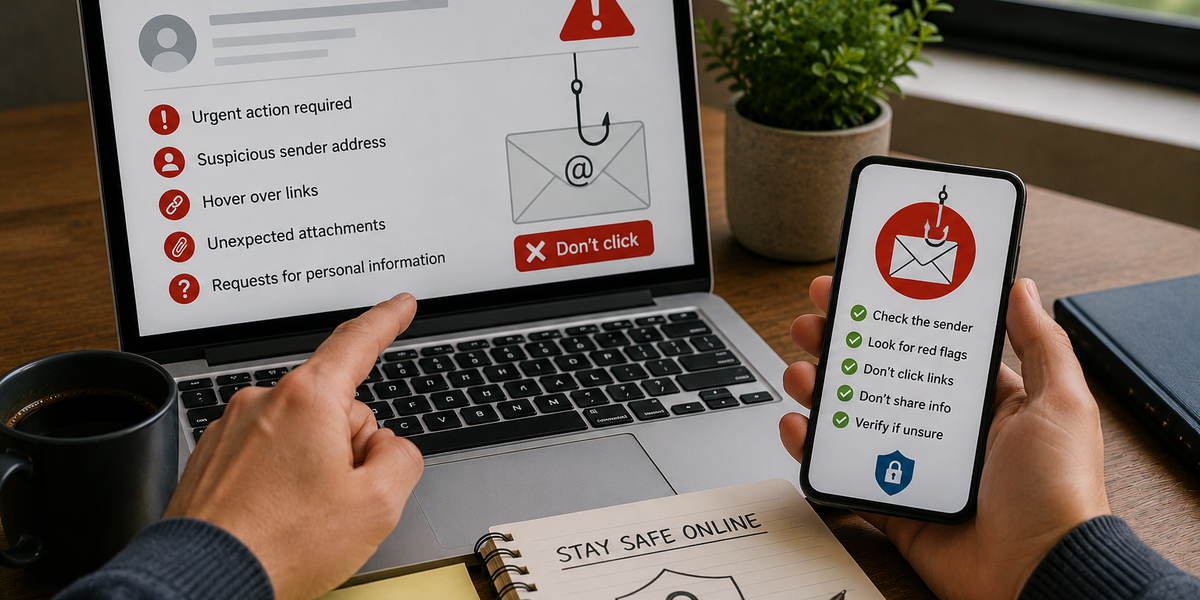
Watch Out for Urgent Language
One of the most common phishing tactics is creating a sense of urgency.
Scammers want people to act quickly before they have time to think critically. Messages may claim that an account has been suspended, a payment has failed, a package cannot be delivered, or a security breach requires immediate action.
The goal is to trigger panic and encourage impulsive decisions.
Legitimate organizations may occasionally send urgent messages, but unexpected demands for immediate action should always be approached with caution.
Check the Sender’s Email Address
At first glance, a phishing email may appear to come from a trusted company.
However, a closer look at the sender’s email address often reveals inconsistencies. Scammers frequently use addresses that closely resemble legitimate domains but contain extra letters, numbers, or subtle spelling differences.
For example, an address might appear genuine until you examine it carefully.
Taking a moment to verify who actually sent the message can often expose a phishing attempt immediately.
Be Suspicious of Unexpected Links
Links are one of the most common tools used in phishing attacks.
Rather than directing users to legitimate websites, these links may lead to fake login pages designed to capture usernames, passwords, and other sensitive information.
Before clicking, it’s worth checking where the link actually leads. If the destination looks unusual, contains strange spelling, or doesn’t match the organization supposedly sending the message, caution is warranted.
When in doubt, visiting the company’s official website directly is often the safer choice.
Don’t Trust Unexpected Attachments
Attachments can sometimes contain malicious software designed to infect devices or steal information.
If you receive an unexpected attachment, especially from an unfamiliar sender, it’s wise to be cautious before opening it. Even messages that appear to come from someone you know may be suspicious if the attachment is unexpected or unusual.
Cybercriminals often rely on curiosity to encourage people to download files they would otherwise avoid.
When something feels out of place, it’s usually worth verifying its legitimacy first.
Look for Spelling and Grammar Mistakes
While many phishing emails have become more sophisticated, some still contain obvious mistakes.
Misspellings, awkward phrasing, unusual formatting, and grammatical errors can all be warning signs. Legitimate organizations typically review official communications carefully before sending them to customers.
That said, the absence of mistakes does not guarantee an email is genuine. Modern phishing campaigns can be highly polished and professional-looking.
Grammar alone should never be the only factor used to judge authenticity.
Be Careful With Requests for Personal Information
Reputable organizations rarely ask customers to provide passwords, payment details, or sensitive personal information through email.
Messages requesting login credentials, banking information, verification codes, or confidential data should immediately raise suspicion.
Even if the request appears legitimate, it’s safer to contact the organization through official channels rather than responding directly to the email.
Protecting personal information often comes down to verifying requests before acting on them.
What to Do If You’re Unsure
Sometimes an email may seem suspicious, but not obviously fraudulent.
In these situations, slowing down is often the best response. Instead of clicking links or downloading files immediately, verify the message independently. Contact the company directly, visit its official website, or speak with someone you trust if you’re uncertain.
Phishing attacks are often successful because people feel pressured to act quickly.
Taking a few moments to investigate can prevent a costly mistake.
Staying One Step Ahead
Phishing emails continue to evolve, becoming more convincing and harder to detect. While technology helps filter many scams, no security system catches every threat.
This is why awareness remains so important. Understanding how phishing emails work and recognizing their common warning signs can significantly reduce the risk of becoming a victim.
The most effective defense is often a simple one: pause before you click.
A few seconds of caution can protect your accounts, your finances, and your personal information from people who are counting on you to act without thinking.